Showing posts with label Nokia. Show all posts

Monday, June 15, 2009

Nokia E72 Appears On YouTube Video


Here’s a leaked video of Nokia’s upcoming E72 smartphone, which seems to be the successor of the recently released Nokia E71. This video was accidentally posted on YouTube by Nokia Conversations, a blog officially run by Nokia. However, not much info is given at the moment, but from what we heard, the handset will sport a 5MP camera with flash, a redesigned QWERTY keyboard, a new navigation pad and a 3.5mm headset jack located on the top side. Sadly, there’s no word on when Nokia will officially announce the E72. Watch the video after the jump to get more details.


Monday, May 4, 2009

AT&T Releases Nokia E71x


The Nokia E71x is now available from AT&T’s website for only $99.99 after a mail-in rebate. The 3G smartphone features a Voice-guided GPS navigation, Wi-Fi connectivity, HTML browser, music player and a 3.2MP camera. Its battery boasts up to 4 hours of talk time or up to 12 days of standby time.

Saturday, May 2, 2009

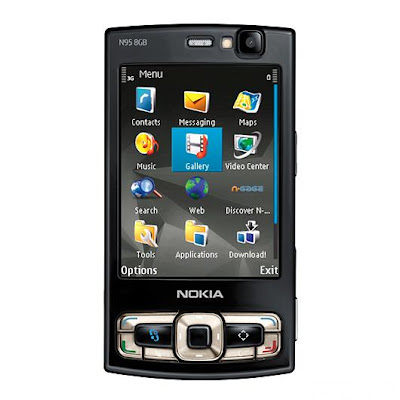
Nokia N95 8GB

The omnipresent N95 spawned a successor and now the question is how much better can it get. Nokia N95 8GB sure has good genes but there still seems to be enough room for improvement. At first glance, Nokia has heeded user complaints with the original and addressed them properly. However, we are yet to see if the enhancements are enough to make the N95 8GB the definitive upgrade from the previous model or is it about laurel-resting mostly.

Nokia N95 8GB official photos


Key features
- 2.8" 16M color QVGA display
- 5 megapixel camera with auto focus and Carl Zeiss optics
- Massive storage capacity and increased RAM
- Wi-Fi with UPnP technology
- Built-in GPS receiver and A-GPS functionality
- Nokia maps application covering over 100 countries worldwide
- Dual-slide design with dedicated multimedia keys
- Standard 3.5mm audio jack
- 3G (with HSDPA), EDGE and GPRS support
- Symbian OS 9.2 Series 60 3rd edition Feature Pack 1 user interface
- TV-out functionality
- 1200 mAh battery

Thursday, April 23, 2009

Nokia N86 Slider Phone


Nokia announced the new N86 8MP, the company’s first 8 Megapixel mobile phone, at the MWC 2009. The N86 8MP is a dual slider that can slide up and down. The phone features a 8 Megapixel camera with a Carl Zeiss Tessar optics, dual LED flash, digital image stabilization, and 30fps video recording.

The N86 8MP has a 2.6-inch 240 x 320 QVGA OLED display, onboard Assisted GPS with Nokia Maps, WiFi 802.11b/g support and Bluetooth. It comes with 8GB internal storage capacity. You can expect a 3.5mm headphone jack and built-in stereo speakers. The phone runs S60 3rd Edition, FP2.

Nokia N86 8MP supports tri-band 3G HSDPA/HSUPA networks. There are 900/1900/2100 and 850/1900/2100 versions, that will be available in Q2 2009 for about Euro 375.

Tuesday, April 14, 2009

Nokia E75


It was announced earlier this year; words said that Nokia is going to release the E75 business phone this month. The E75 is a first device to ship with the new email user interface, offering full desktop email functionality and complete integration of Nokia’s email and messaging services. It has both QWERTY and numeric keypad and also the first E-series that support Nokia’s game service N-Gage. Check out the full specifications after the break.

Nokia E75 Specifications
• System: WCDMA 850/1900/2100
• WCDMA 900/1900/2100
• GSM/EGSM 850/900/1800/1900
• User Interface: S60 platform
• Dimensions: 111.8 mm x 50 mm x 14.4 mm
• Weight: 139 g
• Standby time: Up to 11 days (GSM), 11 days (WCDMA)
• Talk time: Up to 5.4hours (GSM), 4.2 hours (WCDMA)
• Main display: 2.4” QVGA (320×240), up to 16 million colors
• Battery: BL-4U, 1000 mAh, Li-Po
• Memory: Up to 50 MB internal memory, 4 GB card on board, support for up to 16 GB microSD memory card
• Camera 3.2 megapixels (2048 x 1536 pixels)
• Video capture: Video recording in VGA quality
• HSDPA class 6 up to 3.6Mbits
• 384 kbps uplink
• WLAN (IEEE 802.11b/g)
• EGPRS multislot class 32, max download 296 kbps; upload 177.6 kbps
• High-Speed micro USB 2.0 which supports charging
• Bluetooth wireless technology 2.0 with A2DP stereo audio, enhanced data rates (EDR)
• 3.5 mm AV connector

Friday, April 10, 2009

How-To: Speed Up Your Nokia N95 or S60 Phone


Let’s face it: Symbian ain’t exactly the fastest OS in existence. In fact, it can get pretty damn slow. So, direct from the Nokia Phone Blog, are some handy tips to fine-tune your Nokia N95 (or any other S60 phone) for speed without going completely insane.

Learn some fascinating new methods to speed up your Nokia S60 phone.

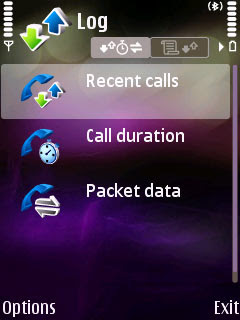
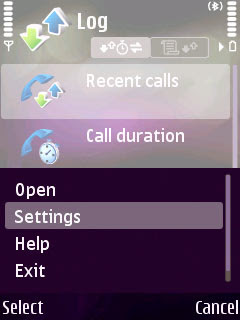
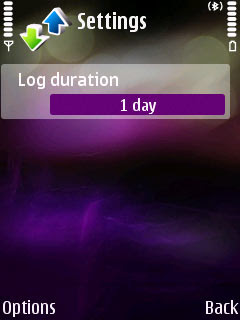
1. Set your log duration to 1 day. Works wonders! Normally, the call log list defaults to 30 days, but that’s completely unnecessary, at least from our speed point of view.

The method: Open up the Log application, hit options (left softkey), and select the Settings option. Change the Log duration to (optimally) 1 day, or you can try 10 days. Either way, it should give you a noticeable speed increase.
2. Use the Edit key to select multiple entries. Here’s a little known tip that I found out quite accidentally: when browsing a list of markable items, hold down the Edit key and use the directional keys to mark (check) multiple items quick and easily. Really handy when you want to delete a lot of text messages, for example, or when you want to add pictures to an album. Unfortunately, due to the way it was programmed, the Edit key doesn’t individually mark an item when pressed once - you need to keep it held down and just use the arrow keys to select items.

3. Use keypad shortcuts when browsing the Menu. Whether your Menu is in grid or list mode, you can use the numerical keypad to quickly jump to an item. It’s easy to see with the grid option enabled - each key corresponds to the item that’s on the menu (12 items, 12 keys). So if you wanted to open the application in the bottom right corner, just hit the # (pound) key. Note that accessing menu items with this method actually executes the application or folder, instead of just selecting the item.

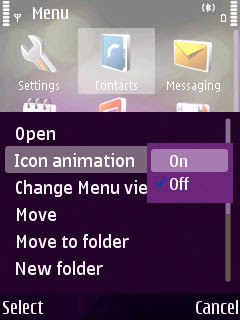
On a similar note, some phones have Icon Animation on by default - this adds a 3D “twisting” effect to your Theme icons. It doesn’t work with custom application icons, and is generally pretty useless. Turn it off by hitting the menu key -> Options -> Icon Animation.
4. Go through text messages faster with Nokia Conversation. Conversation is an interface extension cooked up in Nokia’s Beta labs that lets you read text messages by sender, instead of some huge jumbo list of texts. Another benefit: you can also delete by sender, which is great for cutting people out of your life!

Once you’ve installed the Nokia Contacts Support Services Package and Nokia Conversation, you can access the extension by going to Contacts and hitting the
right arrow key.

Download Nokia Conversation

5. Keypad shortcuts work on the Clock application too. This will probably save you a grand total of one, maybe two keystrokes. In the pre-installed Clock application, typing in a number key at the default screen creates a new Alarm with the hour already filled in.

That’s all.

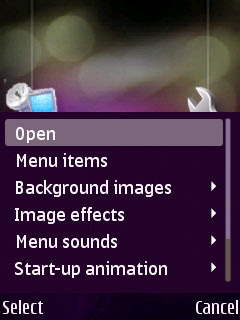
6. The multimedia menu: disable everything. There’s a wealth of useless options when it comes to the Multimedia Menu. Custom background images, imgae effects, “menu sounds”, and start-up animation. Shut everything off for maximum speed. The background image option should be set to Graphics -> Themes, which should just display the current theme’s default background instead of loading another one.

Honestly though, the multimedia menu always seems to be one of the slowest things ever.
7. Finally, keep your phone’s firmware updated! All right, that was a cheap one. But seriously, sometimes Nokia actually improves the user interface a bit - take the latest N95 firmware, for example, which speeds up the Gallery by removing the mean bug that caused the gallery menu to appear for a second or two before (slowly) sliding off the screen.

Got some good tips on saving time with your Nokia N95, S60, or Symbian phone? Share them in the comments section!

Followers